Blog is a regularly updated website or webpage. Blog is usually run by an individual or small group. A blog is an online journal or informational website displaying information in the reverse chronological order with latest post appearing first. The process of updating a blog is called as blogging and the person who keeps a blog is known as blogger. Blog is a discussion or informational website published on world wide web. The word blog is a shortened version of web logs.
Types of Blogs
Microblogging
The process of posting small pieces of digital content on the internet is called as Microblogging. It offers a portable mode of communication. Examples of Microblogging are Twitter, Facebook, Tumbler etc
Personal blog
Commentary written by an individual is called as personal blog. It is a frequently updated online personal journal or dairy.
Group blog
Blogs in which posts are written and published by more than one author is called as group blog. It is based on single uniting theme such as politics, technology or advocacy
Reverse blog
The Reverse blog is also called as inverse blog. The reverse blog is written entirely by users who are given a topic. The blog post are usually screened by a core group or publisher of the blog.
Steps to create a blog post on Blogger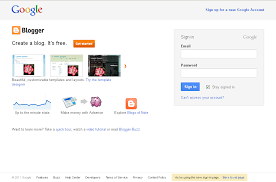
- First login to blogger using the URL http://www.blogger.com
- Using Gmail id and password, login to the blogger and thus the blogger is connected to gmail.
- Click new blog
- Enter the suitable name for the blog, Focus on the blog name the users will identifies. After naming section, then click continue to blogger.
- Now we get a new window click on creating a new blog.
- Then enter corresponding title and adders of your blog (your adders must be available one and don’t use symbols like underscores)
- Choose a starter template this is the basic Layout of your blog.
- Click on creating a blog.
Creating a new post 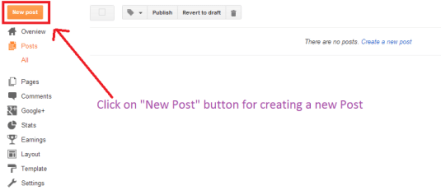
- Click on the new post
- Enter a post title
- Here we can enter the suitable content for the title, Add pictures, and we can add suitable links, etc.
- After making changes or any updating you must click on save button.
- For viewing the preview, There is a option available on the blog.
- Want to publish your post, Click on publish button.
WordPress
WordPress is a free publishing software and content management system based on PHP and MySQL. WordPress is free to install and upgrade. With the help of wordpress we can create a beautiful website or blog. WordPress.com is a blogging platform. It provides free blog hosting for registered users. WordPress pluggin architecture allows users to extend the features and functionality of a website or blog. WordPress uses different themes. The look and functionality of a wordpress website can be changed with the help of themes. WordPress themes are of two types they are free and premium. The wordpress theme directory lists free themes. Premium themes are available for purchase from market places.
Steps to create a blog post on WordPress
- Search for WordPress.com in Google.
- Select my sites tab.
- Open the site selector by clicking on switch site at the top of sidebar.
- Click or tap on Add new WordPress at the bottom of the sidebar.

 Thansih SEO Analyst