Feedburner
Feedburner is a free online service created by Google that allows to automatically send email updates from our blog. It is the most popular feed management system on the internet. It offers way to manage feeds and interact with our visitors. Feedburner provides a way for users to subscribe through email address. The Feedburner email subscription service offers a powerful way to users through which they can subscribe to content and receive it in their email box. Freeburner tools like email subscription can help increase our chances of getting site revisits.
FeedBurner is a Google product. It is a free service that allows you to send emails directly from your blog. You can send your updates through RSS feed or through email. The system comes with tools that enable you to customise your feeds to promote them. Some of the features include a subscription widget which can easily be added to the sidebar of your blog. It also gives statistics on how many people are following your blog.
Advantages of feedburner
Feed Analytics
Feedburner provides statistics about subscribers including how often they visit our site, and also provides details like where they come from.
Feed Redirection
When we move to a different domain or when we switch to a sub folder or sub domain there is chance of loosing our subscribers. Feedburner provides an option to change settings. By clicking edit feed details we can change the URL of our feed.
Publish on social media without plugin
Feedburner helps to connect to our twitter account and send updates. The updates we send can be customised such as the title, title and body, hashtags, additional texts etc.
Feedburner pros
Ease of Use:
FeedBurner is free and extremely easy to create your blog’s feed using FeedBurner. Just follow a few simple steps, and you’re done. The FeedBurner dashboard is easy to navigate and Google offers a help centre to answer any questions you might have.
Promotion:
The widgets and buttons that you can get from your FeedBurner dashboard to invite people to subscribe to your blog and show off the number of subscribers your blog already has are very handy and require no coding knowledge to add to your blog.
Universal Code:
FeedBurner burns feeds using what it refers to as its Smart feed service, which makes feeds created with FeedBurner readable through any device a person uses to subscribe to that feed.
Monetization:
If you want to make money from your blog’s feed, then there is no easier way to monetise it than Google Ad-Sense. Of course, you’re guaranteed to make money from it, but it is very easy to add Ad-Sense ads to your FeedBurner-created feed.
Email subscriptions
 This is viewed as a great feature by many bloggers. The daily subscription that you can offer to your readers for free comes handy as most of them may not know about RSS feeds but have an email account.
Better yet, you can customise the emails that you send to the readers. Subscription comes in a number of languages including English, German, Spanish, French, Russian, Portuguese and Chinese. You can have a subscription form into your page or have it as a widget and can also customise the form as you wish.
RSS(really simple syndication)
RSS (means Really Simple Syndication) retrieves the latest content from the sites you are interested and pulls them into your feed reader where you can read them all in one location rather than visiting each site separately.
Steps to setup feedburner feed
1.Search for Feedburner in Google
2. Log in with Google Account
3. Enter feed URL
4. Feedburner provides options such as “Feed title”, ” Feed Address”. Enter the home page title as the “Feed title”and main domain name as “Feed Address”
5. Feedburner provides the option to check two items. First check “Clickthroughs” to know how many people click those items back to our website. The second option enables us to see detailed statistics that provides important clues about the quality of our website.
Steps for users to subscribe to your feeds through Email
1. Log in to feedburner account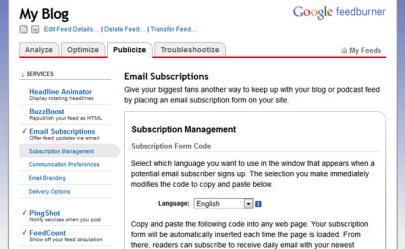
2. Click “publicize” main header/menu.
3. Under Services click email subscriptions.
4. Click “Activate”
5. Go to Appearance >Widgets in our dashboard
6. Click on sidebar
7. Add a text widget to sidebar by dragging it from the available widgets into the side bar area on the right.
8. Add the HTML code for Feedburner email subscription, click save and then close.
5. Copy and paste the code into web page.
Feedburner hurts SEO
 This is one of the main reasons why people have started looking for other options and sidelining FeedBurner. Those who are not shy with marketing and SEO knows about the link wheel. A link wheel is a the perception that every time you post something online, it is distributed to other online sources for the sake of generating back links for your site to the original post. This is advantageous for your site as many back links point back to your site.

 Thansih SEO Analyst